

Piano Learning App for Meta Quest
PianoVision turns your Meta Quest 3, Quest 3S, Quest 2, or Quest Pro into a mixed reality piano practice layer for real keyboards, MIDI keyboards, and hand tracking.
Practice piano with the keys in front of you
PianoVision overlays visual guidance onto your real playing space so you can follow notes, see timing feedback, and build confidence while practicing on Meta Quest.
- Falling-note guidance for songs and exercises.
- MIDI keyboard support for accurate input and feedback.
- Hand-tracking and virtual-keyboard options when you do not have a connected keyboard.
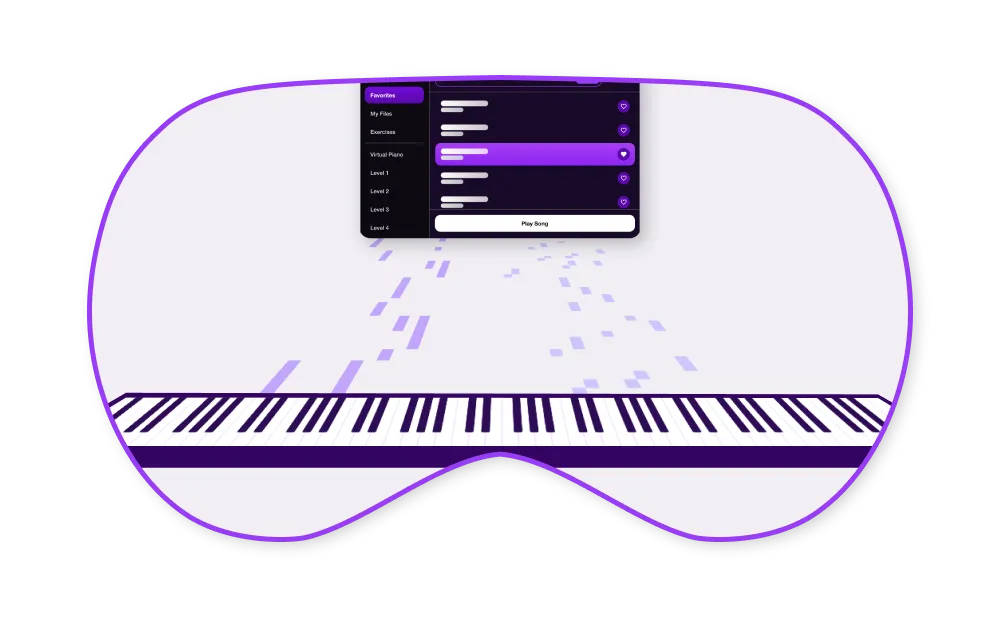
Built for Quest
Designed around mixed reality practice, not a flat-screen piano lesson moved into a headset.
Works with MIDI
Connect a supported MIDI keyboard to track timing, accuracy, and practice progress.
Practice with feedback
Use visual cues, performance statistics, and learning tools to focus each session.
How PianoVision teaches piano on Quest
Instead of watching lessons on a flat screen, you see the guidance mapped onto the keys in front of you. Passthrough keeps your real hands, your real keyboard, and your room in view the whole time.
- Falling notes drop onto the exact keys to press, so you can play real songs from the first session.
- Wait mode holds each note until you play it correctly, then moves on at your pace.
- Ghost hands show finger placement so you build proper technique, not just key-hunting.
- Sheet music mode connects what you play to real notation as you progress.
- Performance feedback tracks timing and accuracy on every run, so practice has a score.
See the full tour on the features page.
Works with the piano you have
MIDI keyboard
Connect over USB directly to the headset, or wirelessly through the free desktop app, for note-perfect feedback. Most keyboards work — check the keyboard compatibility list.
No keyboard yet
Hand tracking gives you a playable virtual piano, so you can start learning on Quest before you own an instrument.
Your own songs
A large built-in library, 10,000+ popular songs with PianoVision Plus, and MIDI file imports for anything else you want to learn.
Frequently asked questions
Do I need a piano or keyboard to use PianoVision?
No. With hand tracking you can play a virtual piano using just the headset. For the best learning experience, a MIDI keyboard gives PianoVision exact note information for timing and accuracy feedback.
Which Meta Quest headsets does PianoVision support?
PianoVision runs on Meta Quest 3, Quest 3S, Quest Pro, and Quest 2, using each headset's passthrough view so you can see your real keyboard while you play.
How do I connect a MIDI keyboard?
The simplest way is a USB cable from the keyboard straight into the headset (usually USB-B to USB-C). You can also link through the free PianoVision desktop app over your home network. Full steps are on the resources page.
Can I import my own songs?
Yes. Upload MIDI files through the desktop app and they appear in your Imports library in the headset. Sites like MuseScore have thousands of MIDI files that work with PianoVision.
Is there a desktop app?
Yes — a free companion app for Windows and Mac that links your computer to the headset for MIDI routing and song uploads. Download it from the resources page.

Let's Connect